

Connect Claude AI and ChatGPT to I Love Cards
This page explains how to connect I Love Cards to Claude AI or ChatGPT using MCP.
The connector URL is:
https://ilove.cards/mcp
Before you start
You need:
- an I Love Cards account,
- access to Claude AI or ChatGPT,
- MCP or connector support enabled in your AI tool,
- permission to add a custom connector.
If you do not see connector settings in Claude or ChatGPT, your plan or workspace may not support MCP connectors yet.
Connect I Love Cards to Claude AI
Claude currently offers one of the smoothest MCP connector experiences.
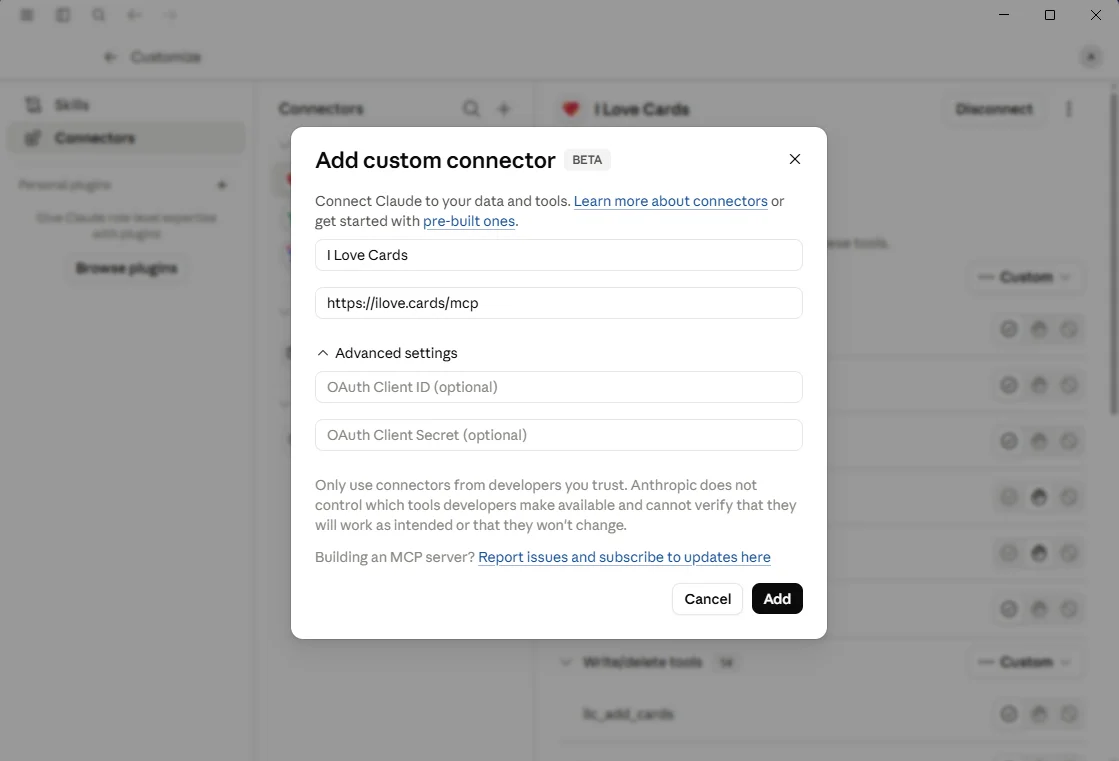
- Open Claude AI in the web app
- Go to Settings
- Open Connectors
- Click Add custom connector
- Enter:
- Name:
I Love Cards - URL:
https://ilove.cards/mcp
- Name:
- Click Add
- Sign in to your I Love Cards account when asked
- Review and approve the requested permissions
Once connected, I Love Cards becomes available as a tool inside Claude.
You can then ask Claude things like:
Create a deck for a 90-minute team retrospective.
Add 20 reflection cards for a leadership coaching session.
Help me improve the wording of this deck for a group of first-time managers.
Connect I Love Cards to ChatGPT
ChatGPT connector setup may depend on your plan and workspace settings. In many cases, you need a paid plan and developer or connector features enabled.
- Open ChatGPT
- Go to Settings
- Open Apps & Connectors
- Open Advanced settings if needed
- Enable Developer Mode if ChatGPT asks for it
- Click Create app, Create connector, or Add custom connector
- Enter:
- Name:
I Love Cards - Server URL:
https://ilove.cards/mcp
- Name:
- Choose OAuth or the recommended authentication method
- Sign in to your I Love Cards account when asked
- Review and approve the requested permissions
Once connected, ChatGPT can use I Love Cards when it is useful for the conversation.
Good to know
MCP support is still evolving in AI tools.
Claude AI and ChatGPT may use slightly different wording in their settings. If you do not see the same labels as above, look for settings named Connectors, Apps, Custom connector, MCP, or Developer Mode.